

Usage
CLI Commands
| Command | Description |
|---|---|
ccmux |
Launch interactive TUI picker (default) |
ccmux picker |
Launch TUI with options (--preview, --icons <style>) |
ccmux picker --persistent |
Dashboard mode (stay open after switching sessions) |
ccmux spawn [agent] |
Spawn a new agent session in a tmux pane |
ccmux invoke [agent] "prompt" |
Run a single agent turn and write the response to stdout (docs) |
ccmux invoke list |
List active and recently-finished invocations (-j for JSON) |
ccmux invoke cancel <id> |
Cancel a running invocation by id (idempotent) |
ccmux invoke result <id> |
Print an invocation’s full captured output (subprocess agents only) |
ccmux show |
List all active sessions |
ccmux show --json |
Output sessions as JSON |
ccmux status |
Show daemon and session overview |
ccmux switch <id> |
Switch tmux client to a session’s pane |
ccmux review [id] |
Review a session’s diff with hunk (defaults to cwd) |
ccmux kill <id> |
Kill a session’s process |
ccmux restart <id> |
Kill and resume a session |
ccmux last <session-ref> |
Print a session’s last response (--turns <n>, --json) (docs) |
ccmux handoff <from> [to] |
Hand a session’s last response to another session (--turns, --note, --spawn, --agent, --cwd) (docs) |
ccmux send <id> <text> |
Send text to a session’s tmux pane (multiline pastes as one message; --no-enter skips submit) |
ccmux send <id> --stdin |
Same, reading the text from stdin instead of argv |
ccmux screen [id] |
Capture pane content |
ccmux screen --grep <pattern> |
Search across all session panes |
ccmux dismiss <id> |
Remove a session from tracking |
ccmux worktree list |
List every worktree of the repos ccmux knows about, plus the one you are in (--repo <path>) |
ccmux worktree prune |
Remove worktrees whose work is finished (--dry-run, --state, --end-idle, --repo <path>) |
ccmux daemon start|stop|restart|status |
Manage the background daemon |
ccmux config set <key> <value> |
Set a preference |
ccmux config get <key> |
Get a single preference value |
ccmux config list |
List all preferences |
ccmux config themes |
List built-in themes (marks the active one) |
ccmux setup |
Install hooks for every supported agent found on PATH (Claude + Codex + Cursor + OpenCode + Pi + omp + Antigravity + Copilot) |
ccmux setup --agent <name> |
Limit install/uninstall/status to specific agent(s); forces install even if not found on PATH |
ccmux setup --status |
Report install state without writing anything |
ccmux setup --uninstall |
Remove hooks (preserves user-owned hook entries) |
ccmux debug |
Diagnose session tracking discrepancies |
ccmux completion <shell> |
Print the completion script for zsh, bash, or fish (install) |
ccmux notify [message] |
Send a notification via the configured backend (bare: test message + diagnostics) |
ccmux sidebar |
Launch narrow sidebar TUI (no preview/footer) |
ccmux sidebar --toggle |
Smart toggle: spawn/kill sidebars in every window across all tmux sessions |
The daemon starts automatically the first time you run a ccmux command (picker, show, invoke, etc.). It runs on 127.0.0.1:2269 and provides both a REST API and SSE event stream.
Preview Pane
Press P to split the picker and preview the highlighted session’s live pane content side by side. Press Tab to focus the preview and act in place: your keystrokes go straight to that agent’s pane, so you can approve a permission, answer a question, or type a follow-up without ever leaving ccmux.
The preview header names the session: the project in bold, then the agent’s own summary of the session on agents that publish one (Claude Code, OpenCode, Cursor, oh-my-pi, and Copilot do; on the rest the line is omitted), then the working directory and the branch/version/target metadata.
When the session has agents running, an Agents section lists each one with its runtime. Finished agents drop off the list.
Diff Review with Hunk
hunk is a terminal diff reviewer. With hunk on your PATH, press d in the picker to review the selected session’s working-tree diff without leaving ccmux: the picker suspends, hunk diff --watch takes over the pane in the session’s repository root, and the picker resumes when hunk exits. The same action is available from the row menu (m, or right-click). If the working tree has no changes, ccmux reports that instead of opening an empty review.
Shift+D reviews the other diff: everything the checkout has changed since it forked, not just what is uncommitted. That is the question worth asking about an agent working in a worktree, which commits as it goes and often has an empty working tree while the branch is the whole point. The base it compares against is whatever ccmux spawn --worktree recorded when it cut the branch, falling back to the merge-base with the repo’s default branch for checkouts ccmux did not create. A checkout carrying no commits of its own beyond that base has no fork point to compare against, so D there shows the working tree, the same as d; a main checkout with unpushed commits does have one, and D shows those too.
To send review feedback back to the agent:
- Press c in hunk to annotate a line, then Ctrl+S to save the note.
- Add any other review notes and quit hunk.
- Confirm Send review comments when the picker resumes. ccmux sends all captured notes, including short source snippets, to the agent as one prompt and stays in the picker so you can watch its status.
The offer relies on hunk’s session JSON commands (hunk session list / session comment list). With an older hunk the review itself still works; the offer just doesn’t appear.
The reviewHandback preference controls what happens when hunk exits:
confirm(default) asks before sending the prompt.autosends and submits the prompt immediately without a dialog.fillpastes the prompt into the agent’s composer without submitting it. The text remains there until you jump to the session and submit or edit it; a later send or invoke may find it prepended.
The review also runs from the CLI:
ccmux review # Review the current directory's repositoryccmux review <id> # Review a session's repository by idInstall hunk with brew install hunk. The d footer hint and help entry appear only when hunk is detected on PATH at launch.
Sidebar Mode
A compact, always-visible session list that lives alongside your working panes. No preview panel, no footer, just status icons and project names.
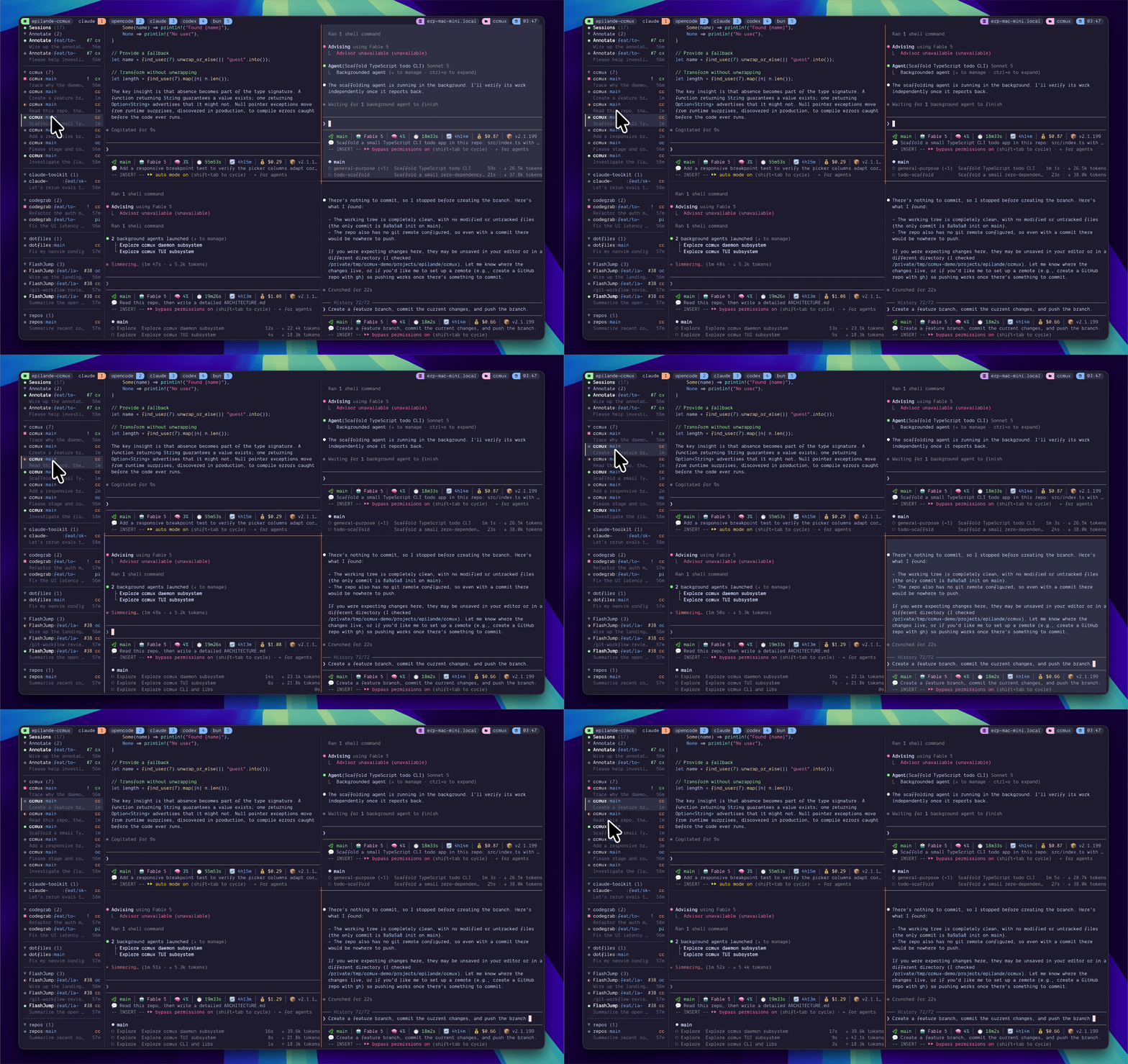
ccmux sidebar --toggle # Toggle sidebars in all tmux windowsccmux sidebar --toggle --width 40 # Custom width (default: 30)ccmux sidebar --toggle --position right # Right side (default: left)ccmux sidebar --resize --width 30 # Snap every existing sidebar pane to <width>The smart toggle fills gaps when some windows are missing sidebars, and kills all sidebars when every window already has one. New windows automatically get a sidebar, and sidebars snap back to their configured width when a window is resized.
Configure defaults so --toggle uses your preferred layout:
ccmux config set sidebar.width 40ccmux config set sidebar.position rightSuggested tmux keybinding (add to ~/.tmux.conf):
bind-key S run-shell "ccmux sidebar --toggle"Notifications
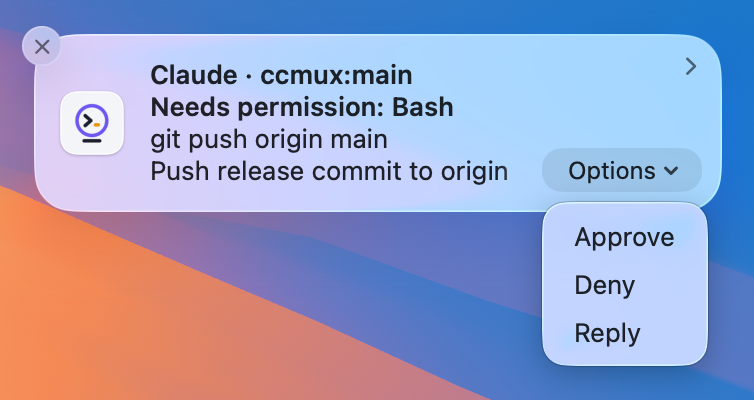
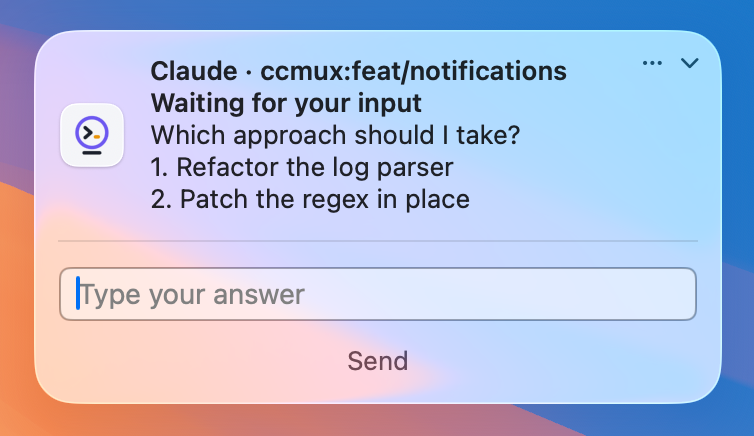
Desktop notifications on waiting/finished transitions, disabled by default. When a session needs permission, or has a plan waiting for approval, the banner carries Approve / Deny buttons; permission, plan, question, and “finished” notifications also carry an inline Reply field, so you can answer, redirect, or send the next instruction without switching to its pane. Focusing a session’s pane clears its notification.
| Permission → Approve / Deny | Question → inline Reply |
|---|---|
 |
 |
ccmux config set notifications.enabled trueccmux notify # sends a test notification and prints setup diagnosticsActionable Approve/Deny buttons work for Claude Code, OpenCode, Codex, Cursor, Gemini CLI, Antigravity, Copilot, and oh-my-pi; Pi has no tool-approval pause, so it never raises a waiting notification. Inline Reply on waiting-state notifications (permission, plan, question) is Claude Code only; Reply on finished notifications works for every built-in agent. A reply the agent’s composer would misread as a command (e.g. leading ! or /) is refused instead of typed, and the text comes back in a follow-up notification so it isn’t lost. Approve/Deny work on macOS and Linux; inline reply needs a notification server that advertises it (always on macOS, varies on Linux).
For OpenCode, one server can host several sessions folded into a single row, so when more than one is waiting at once the buttons are withheld (the keystroke could land on the wrong session’s dialog) and the notification is delivered informational-only.
macOS: the buttons, ccmux’s own name and icon, per-session grouping, and retraction come from a helper app Homebrew installs alongside ccmux, so brew install epilande/tap/ccmux for the full experience. Source installs fall back to osascript (posts as Script Editor, silenced by Focus / Do Not Disturb, no buttons or reply). macOS never shows a permission dialog for a CLI-launched app, so grant it once by hand: run ccmux notify and follow the printed steps (open the settings deep link, find ccmux, enable Allow notifications, set Alert Style to Persistent), then re-run ccmux notify to confirm.
Linux: dbus grouping, click-to-jump, and Approve/Deny are native (no extra binary); inline reply appears only when the server advertises it. A headless daemon (SSH, systemd) needs DBUS_SESSION_BUS_ADDRESS, plus DISPLAY for the notify-send fallback.
Configure further with ccmux config set notifications.<key> <value>, or edit ~/.config/ccmux/ccmux.json directly:
{ "notifications": { "enabled": true, // default false (opt-in) "events": ["waiting", "finished"], // default both "sound": "Glass", // false (default) | true (platform default sound) | macOS sound name "delayMs": 1000, // debounce for "finished" only; "waiting" always fires immediately "backend": "auto", // "auto" | "ccmux-notifier" | "osascript" | "notify-send" | "dbus" | "osc" | "command" "command": "ntfy publish agents \"$CCMUX_TITLE: $CCMUX_BODY\"", // used when backend = "command" },}backend: "auto" picks ccmux-notifier (else osascript) on macOS, and D-Bus (else notify-send) on Linux. command runs your own shell command with CCMUX_* env set (EVENT, SESSION_ID, AGENT, PROJECT, BRANCH, TITLE, SUBTITLE, BODY, PANE), for ntfy, Pushover, and the like. CCMUX_BODY is the complete text (the event line plus any context), so a script reading only it still gets something meaningful; CCMUX_SUBTITLE is the bare event line on its own for structured consumers.
The osc backend delivers notifications through the terminal stream instead of a desktop API, for daemons running on a remote box; see Remote / SSH.
The keystrokes behind the buttons come from a per-agent notificationActions map, overridable per Custom Agents.
Search Mode
Press / to filter the list as you type. ccmux searches several sources at once and highlights why each row matched:
- Metadata (project, branch, path) matches fuzzily, so
ccmxstill findsccmux. - Recent prompts, captured pane content, and live transcripts match by substring, so a content word matches only where it actually appears.
Prompts come from the daemon’s in-memory index, which keeps the most recent prompts per session and is tail-bounded after a daemon restart (only recent prompts are re-read from disk). Transcript search closes that gap: it reads each session’s transcript file on demand and covers the full session history, including assistant replies (Claude and Codex).
Three toggles control what gets scanned: searchPaneContent, searchPaneLines, and searchTranscript (see Configuration).
Spawning Sessions
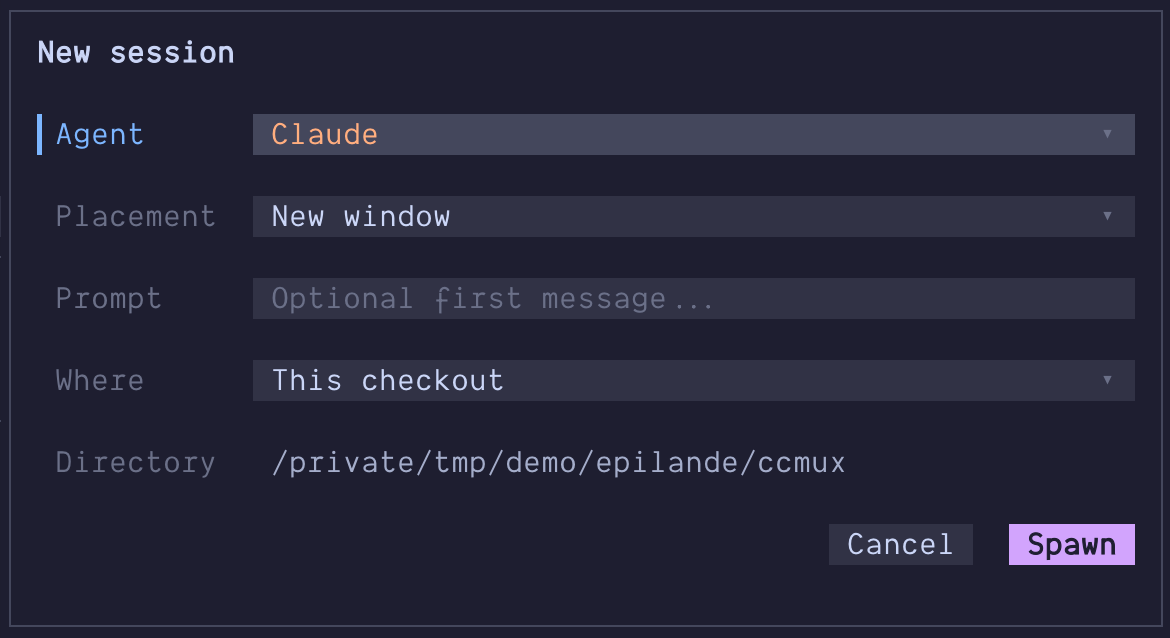
Launch new agent sessions directly from the CLI:
ccmux spawn # Spawn claude (default) in a new tmux windowccmux spawn codex # Spawn a specific agentccmux spawn --split # Split current pane instead of new windowccmux spawn --split h # Split left/right ('v' is the stacked default)ccmux spawn --target %12 # Split (or place the window next to) a specific paneccmux spawn --detach # Don't switch to the new paneccmux spawn --cwd ~/proj # Set working directoryccmux spawn --resume <id> # Resume an existing sessionccmux spawn --fork <id> # Branch an existing session into a new oneccmux spawn --prompt "fix the tests" # Send an initial promptccmux spawn --model opus # Start the agent on a model (its own flag, e.g. claude --model)ccmux spawn --worktree --prompt "fix flicker" # Spawn into a git worktree (name derived from the prompt)ccmux spawn --worktree fix-flicker # Spawn into a named worktree, creating it if neededccmux spawn --worktree --base develop --prompt "fix flicker" # Branch the new worktree from developccmux spawn --worktree fix-flicker --with-changes # Move this checkout's uncommitted work into itccmux spawn --worktree fix-flicker --with-changes --untracked copy # Untracked files land in bothccmux spawn --fork <id> --worktree # Fork into a fresh worktree off the source's branchccmux spawn --pr 154 # Check that PR out in a worktree, on its own branchccmux spawn --issue 150 # New worktree named after the issue, prompt seededSplit directions use tmux’s own vocabulary: h puts the new pane beside the
old one, v stacks it below. Run inside tmux, ccmux spawn uses the pane you
ran it from, so the new pane or window lands in your session rather than
wherever the daemon happens to consider “current”. A new window is appended at
the end of your session, which leaves every existing window index alone; pass
--target <pane-id> to insert one directly after that pane’s window instead
(tmux renumbers the windows after it), or --target none to let tmux place it.
--target accepts any pane on the server, including one in a different tmux
session: ccmux creates the pane there and moves your client over to it, the
same jump ccmux switch makes. Pass --detach to leave your view where it is.
That jump needs a client of its own to move, so it only happens when you run
ccmux spawn from inside the session you are attached to; run from outside
tmux, or from a detached session, it creates the pane without switching (use
ccmux switch afterwards).
--prompt starts the agent interactively with the prompt already submitted.
It is supported for the agents whose interactive-with-prompt invocation ccmux
has verified; for anything else (including custom agents) ccmux refuses the
spawn rather than guessing a flag, and you can teach it the right shape with
promptCommand in your agent config.
--model <name> starts the agent on that model, passed through as the agent’s
own flag (--model for every built-in, read from each CLI’s --help). An
agent with no known flag, including a custom one, refuses the spawn; declare
modelFlag in its config to teach it. A new window is named after the
worktree when the spawn has one (fix-flicker, issue-150-..., pr-154-...)
and after the agent otherwise, so a batch of spawns is tellable apart; the name
pins tmux’s automatic-rename off for that window.
--worktree [name] spawns the agent into a git worktree at
<main>/.claude/worktrees/<name>, creating it first if it doesn’t exist yet.
An explicit name is create-or-open: spawning into the same name again reuses
that worktree rather than failing. Without a name, ccmux derives one from
--prompt’s opening words; a derived name that collides with an existing
worktree gets a numeric suffix (-2, -3, …) instead of reusing it, since
two different prompts landing in the same worktree would silently merge
unrelated work. --base <ref> sets what the new branch is cut from,
defaulting to the main checkout’s current branch.
Creating a worktree also adds **/.claude/worktrees/ to the hosting repo’s
.git/info/exclude (the same line Claude Code writes, and the same file —
local to your clone, never .gitignore), so the worktrees don’t show up as
untracked work in the checkout that hosts them. It is added once, only if git
isn’t already ignoring that path, and nothing else in the file is touched.
Spawning on a PR or an Issue
--pr <n> resolves the pull request with gh, fetches pull/<n>/head, and
spawns the agent into a worktree checked out on the PR’s own branch, set
up to track it the way gh pr checkout would, including a fork PR, whose
branch is pointed at the fork’s clone URL so git push updates the PR instead
of failing. The worktree is named pr-<n>-<head-ref>, which deliberately
never collides with the pr-<n> directories Claude Code creates for its own
fetch-only PR checkouts. --base is refused here: the PR’s head is the start
point. ccmux records origin/<base> as the branch’s review base, so d
in the picker shows the PR’s actual diff.
--issue <n> is an ordinary spawn-from-base worktree named issue-<n>-<title>;
--base works as usual.
Both seed the agent’s opening prompt with the title and URL, and your own
--prompt is appended after it. A PR whose branch is already checked out is
opened rather than duplicated; a second --issue of the same number opens the
existing issue-<n> worktree the same way. Both refuse rather than guess: a
PR that is not open, an issue that is closed, and a same-named local branch
that is not that PR (a branch counts as the PR’s only when its merge and remote config
both already point at it, so a fork PR cannot ride in on a name collision with
one of your origin-tracking branches). The remote is compared as a repository,
not as text, so a branch you set up yourself with git remote add fork <url>
and git checkout -b <branch> fork/<branch> is recognized as the PR’s. A local
branch that is the PR is fast-forwarded, never force-updated. If it has
diverged, ccmux leaves it alone and says so.
ccmux fetches the PR from origin, while gh resolves the number through its
own repo selection (gh repo set-default, GH_REPO, a fork clone’s upstream).
If those name different repositories, ccmux refuses and names both rather than
checking out a same-numbered PR from the wrong repo.
Programmatic Invocation
ccmux invoke runs a single agent turn and writes the response to stdout, so you can use real agents in shell pipelines and scripts. See docs/invoke.md for the full reference.
ccmux invoke claude "say hi in one word"echo "what is 2 + 2" | ccmux invoke claudegit diff main | ccmux invoke claude "Review this diff"Claude runs interactively in a dedicated tmux session and returns clean text parsed from the transcript JSONL. Codex, Cursor, OpenCode, Pi, oh-my-pi, Antigravity, Copilot, and Gemini run as non-interactive subprocesses (codex exec -o, cursor-agent --print, opencode run --format json, pi -p, omp -p, agy -p, copilot -p --allow-all-tools, gemini -p) and return the agent’s clean response text.
For orchestration, name an invocation with --id <id>, then use ccmux invoke list, ccmux invoke cancel <id>, and ccmux invoke result <id> to watch, cancel, or read its full captured output by that id. See docs/invoke.md for the fire-and-poll reference.
Reading and Handing Off Between Sessions
ccmux last prints a session’s last response; ccmux handoff moves it into another session without the text passing through whoever ran the command. See docs/handoff.md for the full reference.
ccmux last codex                       # print the last response, pipeableccmux last codex --turns 3             # widen to the last three exchangesccmux last <id> | pbcopy
ccmux handoff codex claude --note "this is the failing test, take it from here"ccmux handoff self codex               # an agent handing off its own conclusionccmux handoff self --spawn             # ...into a session that does not exist yet
Both take a session reference, not just an id: a session id, %pane, session:window.pane, self, an agent type, or a project name. Fuzzy references are scoped by where you are sitting (same window, then same tmux session, then everything), and an ambiguous one is refused with the candidate list rather than guessed at.
A handoff arrives with a provenance header naming the source session, agent, directory, branch, and time, and is only ever typed into an idle composer: a target that is mid-turn gets it queued and delivered when the turn ends, and a target with a pending prompt is refused.
In the picker, the row menu’s Copy opens a small dialog asking how much to take: it starts on the last response, so Enter copies that straight to your clipboard, while j/k or a digit counts up to 20 turns (which brings your own prompts along, formatted exactly as ccmux last prints them). Hand off starts a pick-target mode: the session list itself becomes the target picker, j/k move, and Enter (or a click) opens a dialog asking how many turns to send and offering a one-line note for the receiving agent. Enter there sends and Esc cancels the whole handoff. A queued handoff shows a ⇄ badge on the target row until it lands.
Agent Skills
This repo ships two Agent Skills for your coding agent: dispatch teaches it to orchestrate other agents through ccmux invoke (firing, fan-out, joining, cancelling, and reading worker output), and relay teaches it to read a peer session’s output with ccmux last and move it into another session with ccmux handoff. For Claude Code they install together as one plugin (this repo doubles as a plugin marketplace):
/plugin marketplace add epilande/ccmux/plugin install ccmux@ccmuxOther skills-capable agents (Codex, Cursor, OpenCode, and others) can use the same skills by copying them into their skills directory. Both are additive glue for the ccmux CLI, which must be installed and on your PATH. See plugins/ccmux/README.md for details.