

Worktrees
Moving Uncommitted Changes
--with-changes relocates the checkout’s uncommitted work into the worktree
it creates, so the new agent starts on top of it and the checkout you left is
clean:
ccmux spawn --worktree fix-flicker --with-changesMove changes in a session’s context menu does the same thing from the picker. It only appears for a row whose checkout is actually dirty, and it opens the new-session dialog already set to move: the destination is locked to a new worktree, an Untracked row appears, and the name and prompt stay editable.
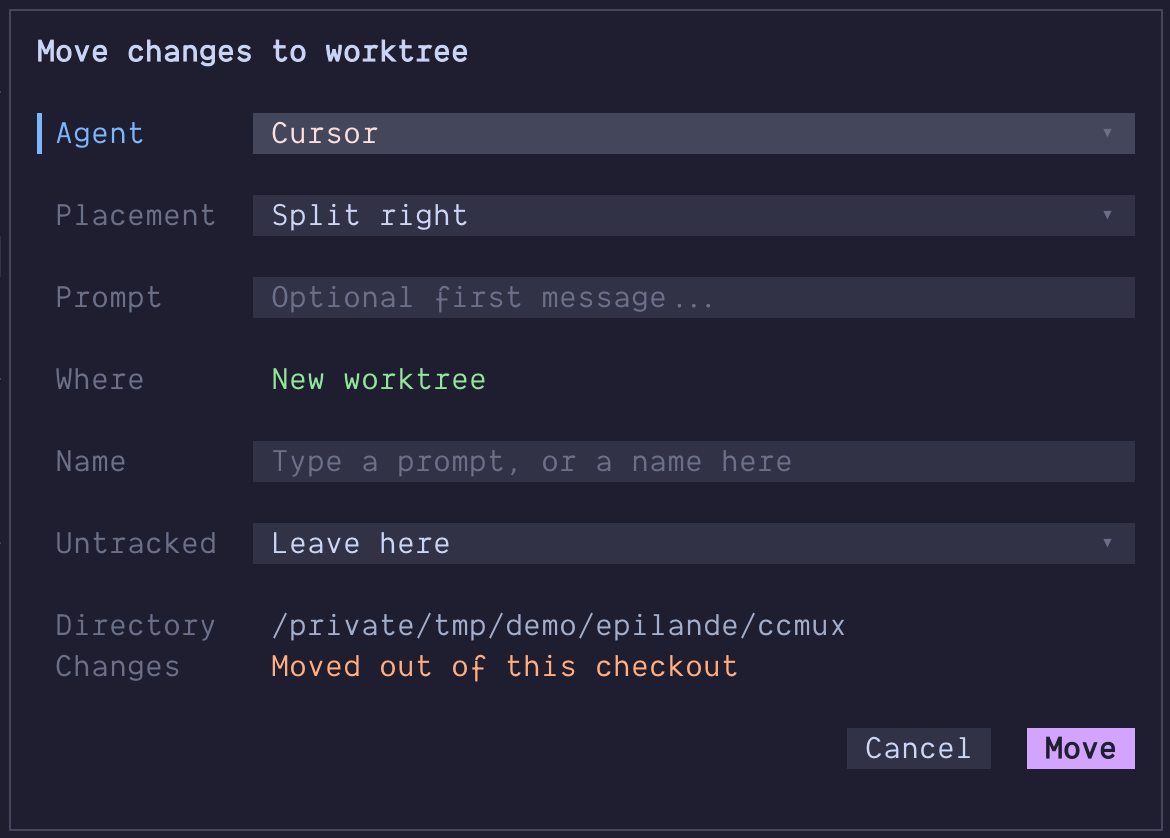
The picker holds any outcome that needs your attention until a keypress: a failure that parked your work in a stash (with the command to get it back), a move that completed but could not drop its own backup entry, a staged/unstaged split it could not preserve, or a spawn that failed after the changes had already moved (naming the worktree they moved into). Only refusals that changed nothing (a name already taken, nothing to move) are a passing toast, since the fields to fix them are still in front of you. The sidebar toasts what a clean move did; the picker jumps straight into the new pane, as it does for every other spawn.
Untracked files move by default (leaving them behind would strand the work
you are relocating). --untracked copy puts them in both places,
--untracked leave keeps them where they are. Gitignored files are never
moved or copied in any mode; worktree.symlinkDirectories and
.worktreeinclude cover those.
The move is stash-first: your changes are stashed out of the checkout, the worktree is created, the entry is applied into it, and only then is the entry dropped. If anything fails before the entry is dropped, your checkout is put back as it was, and the stash entry holding your work is reported by sha whether or not the restore succeeded.
Staged and unstaged changes arrive as you left them where git allows it; if
the split cannot be preserved, everything still moves and you are told to
re-run git add.
ccmux refuses to run at all while a merge, rebase, cherry-pick, revert, or bisect is in progress, and refuses a worktree name that already exists — a move needs a fresh worktree, because rolling one back would take a checkout it did not create.
Forking Sessions
Fork starts a second session that continues an existing conversation’s history, in a pane beside the original, and leaves the original running and untouched. (A source with no pane of its own gets a new window instead.)
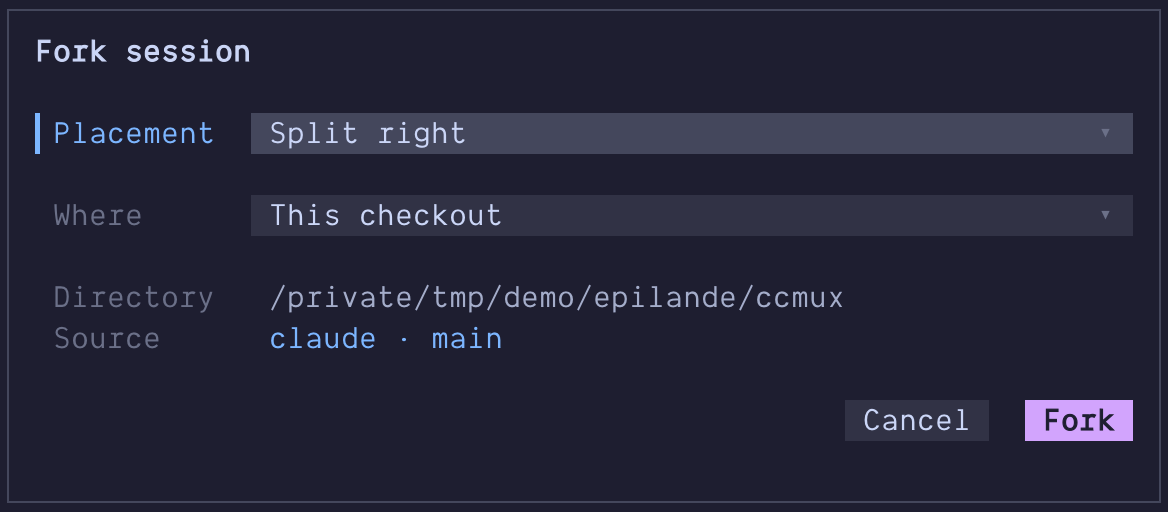
F in the picker, or Fork in a session’s context menu, opens the
new-session dialog over the row; Enter on it forks straight away, into a pane
beside the source’s own. ccmux spawn --fork <session-id> forks the same way
but places the result like every other ccmux spawn, relative to the pane you
run it from. Either way the new pane is tracked like any other session, with
its own row, state and id.
The fork starts in the source’s directory by default. --cwd elsewhere is
honored, since the fork resumes the source’s transcript by path rather than by
looking a session id up under the current directory.
--worktree goes one further and creates the destination, so the two sessions
edit their own checkouts instead of one. The worktree is named after the branch
the source is on (<branch>-fork, numbered -2, -3 if that name is taken)
and cut from it, so the fork continues on the history its conversation was
written against. Name it yourself with --worktree <name> or pick the ref with
--base. --with-changes is refused on a fork: the original session is still
running in the checkout those changes would be moved out of.
The picker’s version of that is the Where row in the dialog F
opens. It starts on This checkout, so an untouched dialog is the plain fork
beside the original; move it to New worktree and a Name row appears,
previewing the <branch>-fork the daemon would derive and taking one of your
own instead. A Source row names the conversation being continued;
everything else comes off the row. Where the source is not in a git repository
the choice is locked to its own checkout, since there is nowhere for a linked
one to go.
Fork needs two things, and the picker hides the action when either is missing:
the agent has to declare how it forks (forkCommand), and ccmux has to know
which conversation the pane holds. For most agents that knowledge comes from
hooks, so run ccmux setup if the action isn’t offered.
Today Claude Code is the only agent that ships a fork command, because it
is the only one whose behavior when resuming a still-running session has been
verified. Adding another is one config line once you have checked it yourself
(see docs/agent-adapters.md).
Worktrees Panel
After a branch is merged (and auto-deleted on GitHub), three leftovers stay on your machine: the worktree directory, the local branch, and often a tmux pane with a finished agent in it.
W in the picker (or Worktrees on a group header) opens the Worktrees panel: every worktree of every repo in scope, main checkout first, with its branch, ahead/behind, uncommitted counts, open PR, and the agent living in it. Enter jumps to that agent, or starts one in a worktree that has none. Tab widens from the selected row’s repo to all of them, y copies a path, and d reviews what the branch changed since it left its base (not just what is uncommitted, which is what d on a session row shows).
The panel has a second view: l switches to Pull Requests, every open PR of the repos in scope, with its branch, author, review state and checks, and the worktree it is already checked out in where there is one. Enter there cuts a worktree from the PR (or jumps to the agent already in it), o opens it on GitHub, and h goes back to the worktrees. The two axes are independent: Tab still scopes either view to one repo or all of them, and the tab line under the title names both views with the live PR count.
N in the picker (or n inside the Worktrees panel) opens the source picker: every open pull request and every open issue of the repos in scope, in one list, with the worktree that already holds each one where there is one. / filters across both at once, so a word you remember finds it whether it was filed as a PR or as an issue, and the section counts follow what you type. Enter starts work on the row: it cuts a worktree from a PR’s head, or one named after an issue and seeded with it, and where a checkout already exists it goes there instead of starting a second agent in the same tree.
The panel loads in two passes: the list paints immediately from local git state, then the prune classification (which fetches and asks GitHub) merges in and sinks the finished worktrees to the bottom of their group. Those, and only those, become selectable for removal, showing why each one is removable. Space selects a row, and x removes what you selected after a confirmation that spells out what goes with it; on a single clean removable row, x with nothing selected takes that row. ccmux worktree prune runs the same classification from the command line:
| Reason | Meaning |
|---|---|
PR merged |
GitHub says the branch’s PR was merged (survives squash/rebase merges) |
merged locally |
The branch tip is an ancestor of the default branch |
upstream gone |
The branch had an upstream and it’s gone after a fetch --prune |
PR closed |
The PR was closed without merging; the branch is kept |
A worktree an agent is working or waiting in is never offered. One whose only occupant is an idle agent is offered when GitHub reports its branch’s PR merged, as an explicit opt-in: the panel labels the row, and the CLI needs --end-idle. Removing a worktree stops its agent (SIGTERM, escalating to SIGKILL if it does not exit) and closes its pane before the directory goes; the agent’s transcript is its own file and survives the removal, though agents that resume by directory rather than by session id (opencode --continue, pi -c, omp -c) lose the way back to it once the worktree is gone. Removal then deletes the directory, attempts to delete the local branch, prunes git’s metadata, and drops the directory’s entry from ~/.claude.json. A worktree whose agent still won’t die even after SIGKILL is refused rather than deleted, so nothing is removed out from under a process that may still be writing to it. Branch deletion follows the evidence rather than the reason: a merged PR is force-deleted (git branch -D, since a squash merge leaves the tip unmerged by git’s definition), merged locally and upstream gone use the safe git branch -d and report a refusal if git says the branch still holds unmerged work, and PR closed keeps the branch entirely.
Safety rules, in short: a worktree with a working or waiting agent is never offered and an idle one is offered only on a merged PR and only behind an explicit opt-in (--end-idle in the CLI, the labeled row in the panel), a branch still sitting on a base’s tip is never classified as merged, a worktree whose PR state cannot be established (gh missing, logged out, offline, or pointed at a host it does not recognize) is skipped with the reason shown rather than treated as having no PR, nothing is pre-selected, dirty worktrees (uncommitted or untracked changes) need their own D opt-in on top of being selected and are re-checked immediately before deletion, a pane still working inside the worktree when the removal runs blocks that one removal (an editor counts as work; a bare shell left sitting there does not, and neither does a ccmux picker or sidebar), a worktree.symlinkDirectories symlink does not count as dirty (it is setup, not your work), gitignored files that would be deleted are surfaced before you confirm (the CLI lists them, the picker shows a count with up to two names on the row), and the main checkout is never a candidate.
Each directory is renamed to a .ccmux-trash-<name>-<timestamp> sibling before being deleted, so the path frees immediately and the contents survive for the length of the run. If ccmux is interrupted mid-run, look for that directory next to where the worktree was: mv .ccmux-trash-<name>-<timestamp> <name> restores it, and git worktree repair <name> re-links it to the repo.
ccmux worktree prune # Interactive confirm listccmux worktree prune --dry-run # Show what would go, change nothingccmux worktree prune --state # Also drop agent state entries (see below)ccmux worktree prune --end-idle # Also offer worktrees whose only agent is idleccmux worktree prune --repo ~/p # Limit to one repository--state removes ~/.claude.json entries for any recorded directory that does not exist right now, not only former worktrees, so an ordinary repo you have not checked out will be dropped too. Entries whose parent directory is also missing are skipped, which keeps an unmounted external drive or a disconnected network share from taking every project on it with them. The removed paths are printed, and the file is copied to ~/.claude.json.ccmux-backup-<timestamp>-<pid> first (the newest three are kept).
There is no --yes and no automatic mode; removals are always confirmed interactively. --dry-run changes nothing on disk, though it still runs git fetch --prune per repo, which is what makes the upstream gone signal visible and does update remote-tracking refs.